
Wallets and balances
Bank accounts, cash, cards, savings goals and money you lent: how each wallet works and how to keep its balance right.
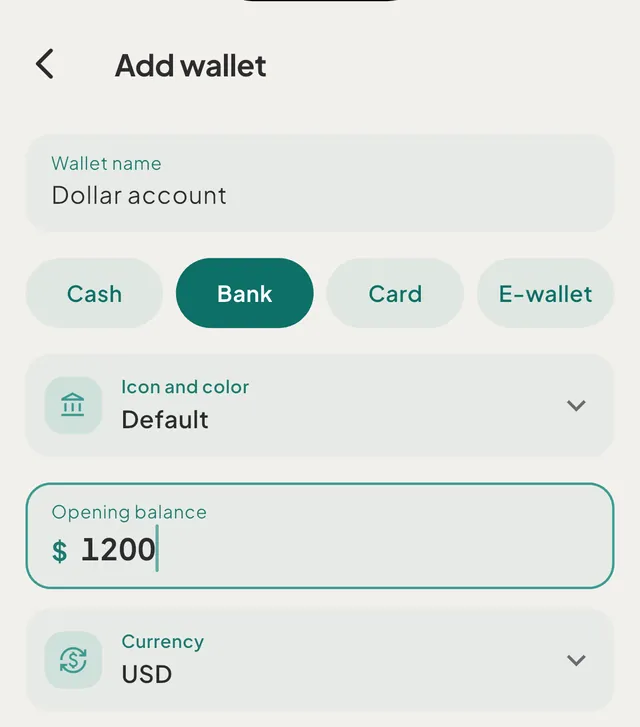
- Wallet types and what each one counts towardCash, Bank, Card and E-wallet are spending wallets. Savings goals, debts, money you lent and investments are separate kinds with their own rules.
- Add a walletAdd a cash, bank, card or e-wallet wallet from the Money tab with a name, an opening balance and a currency. The currency cannot be changed later.
- Update a balance that does not matchOpen the wallet, tap Update balance and type the amount you can see. Tavala adds one dated correction for the difference, and you can undo it.
- Track a credit cardTavala has no separate credit card wallet. Track a card as a Card wallet or as a debt, and see how each choice changes What's Left and net worth.
- Save toward a goalCreate a savings goal with a target, fill it with transfers from your wallets and follow the progress. Goals count in net worth but not in What's Left.
- Track money you lentRecord money you lent to someone as Lending, take it out of a wallet if you lend it now, and log each repayment until the card reads Settled.
- The Money tab and your net worthThe Money tab shows your net worth, this month's Money in and Money out, and every wallet, goal, debt and loan. See how each figure is worked out.
- Archive a wallet you no longer useTavala cannot delete a wallet, only archive it. Swipe its card on the Money tab to hide it and take it out of your totals, with its history kept.
Still need help?
Write to support@tavala.io and a person replies. Say which device you are on, the app version and whether you are signed in, and what you did just before it happened. What to include, and how to send it from the app.