
Privacy and security
What Tavala stores, the app lock, hidden amounts, two-step verification, your data and deleting your account.
- What Tavala stores and who can see itWithout an account your records never leave your device. With one, they sync to Tavala's servers. What is stored, who sees it, and the controls you have.
- Lock Tavala with Face ID, a fingerprint or a passcodeTurn on the app lock so Tavala asks for Face ID, Touch ID, your fingerprint or your device passcode every time it opens. Not available in a browser.
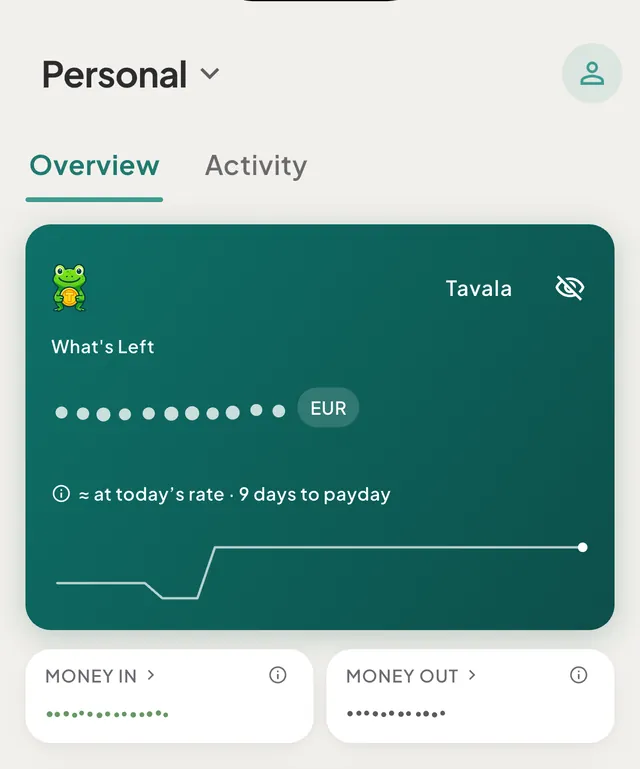
- Hide amounts on screenTap the eye on the Home card to replace every amount in the app with dots, then tap it again to bring them back. The choice stays on this device.
- Turn on two-step verificationAdd an authenticator app so signing in asks for a 6-digit code after your password. Setup steps, what happens if you lose the app, and how to turn it off.
- Sign in with a passkeyAdd a passkey to sign in to Tavala with Face ID, your fingerprint or your screen lock instead of a password. Add, use and remove passkeys.
- Export all your dataSave everything you entered in Tavala as one JSON file - wallets, transactions, budgets, recurring rules, bank connections and trips. It is not encrypted.
- Delete your accountDelete your Tavala account and the data synced to it from Settings. What goes, what happens to shared spaces and subscriptions, and why it cannot be undone.
Still need help?
Write to support@tavala.io and a person replies. Say which device you are on, the app version and whether you are signed in, and what you did just before it happened. What to include, and how to send it from the app.