
Add an expense in one line
Tap +, type a line such as "coffee 4.80" in one of six languages and tap the arrow. Tavala reads the amount, currency, category, wallet and date.
On this page
The fastest way to record money is one line of text: what it was and what it cost, in your own words. Tavala reads the line as you type, shows what it understood as chips above the field, and saves it with one tap. A line you have typed before is two taps: its suggestion chip, then the arrow.
Add an entry
- Open the capture bar:
- On a phone, tap the round + in the middle of the bottom bar. It is there on every tab.
- On an iPad or a Mac, tap or click + at the top of the rail, or Add transaction in the sidebar. With a keyboard, press Command-N (Ctrl-N on Windows and Android).
- Type the amount and a few words, in any order:
coffee 4.80or4.80 coffee. If you typed the same thing before, tap its suggestion chip instead (see Suggestions from your own entries). - Check the chips above the field: the amount, the category, the wallet, the date and the type.
- Tap the arrow on the right, or press Return. The entry is saved and the bar closes.
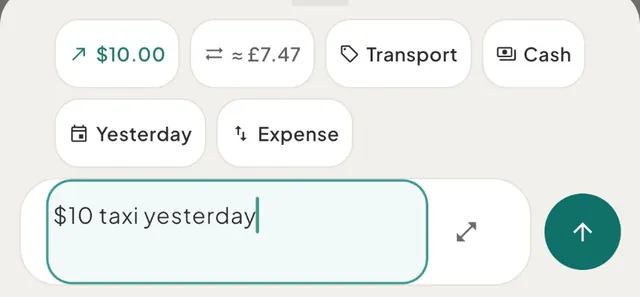
The words you typed, minus the amount, the currency, the date and the wallet, become the entry's note ("taxi"). The entry appears at the top of HomeActivity and What's Left goes down at once.
What one line can hold
Write as much or as little as you like. Everything except the amount is optional.
| Part | Examples |
|---|---|
| An amount, in the way you write numbers | 4.80, 4,80, 1.500 or 1,500 (one thousand five hundred), 1 234,56, 12€50, 1.5k |
| Arithmetic | lunch 12+8 and lunch 12 + 8 are 20.00, 89,90 - 10 is 79.90, 40/3 is 13.33 |
| A count times a price | 3x 4,20 beer is 12.60, 2 pints @ 5.80 is 11.60 |
| A currency, by code, symbol or word | taxi 1200 MKD, $10 taxi, 20 quid, 12 euros, euros 12 café, 250 денари, 200 रुपये |
| A date, in words or numbers | yesterday, last night, monday, last friday, 3 days ago, 2 weeks ago, 4.10.2026, 3 oct |
| A category word or a shop | coffee, kaffee, rewe, mercadona, monoprix, бурек, chai |
| A wallet | 20 coffee cash, 45 groceries from current account |
| A trip or a project that is on | 45 dinner lisbon, or the place in another language: 45 cena italia for a trip called Italy |
| Income or a refund | got paid 3200, salary 3200, +3200, 40 refund dinner |
| An estimate | ~45 dinner, about 45, ca. 120, unos 30 |
| A dictated line | twelve fifty lunch yesterday is 12.50, dated yesterday |
A few rules worth knowing:
- A single separator before three digits is a thousands separator.
1.500 laptopand1,500 laptopare both 1,500.00.1.50and1,5are still one and a half. - A count gives way to the price. In
2 coffees 7.60the amount is 7.60 and "2 coffees" stays in the note. - Say it instead of typing it. Tap the microphone on your phone's keyboard and say the line. Number words are read like digits in all six languages, and "twelve fifty" is 12.50, never 1,250. If you correct yourself ("fifteen for parking, no wait, eighteen"), the last figure counts.
Every format, word and rule is listed in everything the capture bar understands.
Six languages
The bar reads English, German, Spanish, French, Macedonian (Cyrillic and Latin letters) and Hindi
(Devanagari and romanised), whatever language your phone is set to. That covers numbers, number
words, dates and weekdays, currency words, category words and shops, income, refund and transfer
words, and estimate words. You can mix them: vorgestern 1.500 laptop works on an English phone.
Some short forms are read only when your phone is set to their language, because they mean
something else in another one: short weekdays such as sat, Fr or vie (unless you add a full
stop, sat.), the German estimate word so, and numbers spelled in Latin letters in Macedonian or
romanised Hindi. See the
example lines in each language below.
Correct a chip
Each chip shows one thing Tavala understood. Tap it to change that one thing:
| Chip | What a tap does |
|---|---|
| Amount | Nothing: the text you typed is the amount, so edit the text. When the bar asked which currency a word such as kr means, the chip opens the currency picker again, so you can change your answer |
| Category | Opens the category picker, with your often-used categories first. Pick one, or No category |
| Wallet | Opens the wallet picker, when you have more than one spending wallet |
| Date | Opens the date sheet, with Today, Yesterday and the day before that as quick choices |
| Type (Expense, Income, Refund) | Switches to Income, then Refund, then back to Expense |
| Trip or project | Opens the trip chip's sheet, to choose one or Everyday |
| ≈ conversion | Nothing: it shows what the wallet is charged in its own currency |
All the chips are on screen at once: when they do not fit on one line, they wrap to a second one.
A category in italics with an outline is a guess from a common word, such as "coffee" for Food & Dining. It turns upright once it matches one of your own category names, once Tavala has learned it for that note, or once you pick it.
Suggestions from your own entries
The bar offers what you type often, so a repeat entry needs no typing.
- Before you type. Up to four chips sit above the empty field, such as "coffee · €4.80": the notes
you typed most in this space over the last 90 days, each with the amount you used last time. Tap
one and the line is filled in (
4.80 coffee). Check the chips and tap the arrow. - While you type. From the second letter, up to three chips complete what you are typing from your past notes ("cof" offers "coffee · €4.80"). A tap fills the line with that note and its last amount.
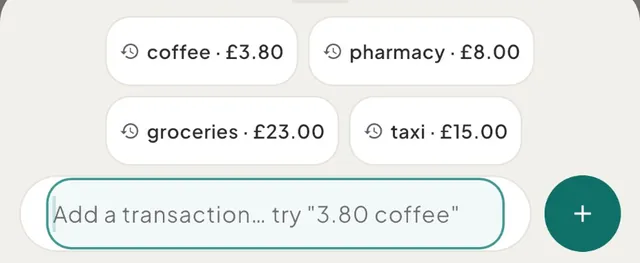
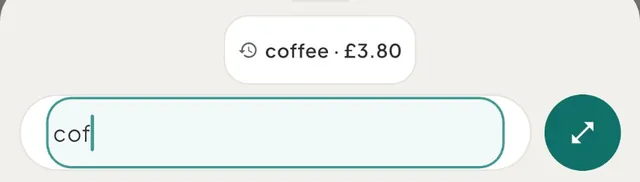
A suggestion never saves anything by itself: it only fills the field. The amount is the last one you used, never an average, and you can change it before you save. With hidden amounts on, the chips show the note alone. With larger text sizes the bar shows two chips. A new space has no suggestions until you add entries.
When the bar asks first
Some lines can be read more than one way. Instead of guessing, the bar marks the doubt with a question mark on the chip, in copper, and does not save from the bar. The round button turns into Finish in the form (the expand icon), so the rest is one tap away. Nothing you typed is lost.
| You type | The bar shows | What to do |
|---|---|---|
A currency several countries share, without a code: kr 50 bus, pesos 800 tacos | The amount chip as you wrote it, "kr 50?" or "pesos 800?" | Tap the chip and pick the currency under Which currency?. Once you save, Tavala remembers the answer on this device, so kr 20 bus reads at once next time |
A movement between your own wallets: moved 200 to savings | Transfer, "From Current account" and "To Dollar savings" | Tap the round button: the transfer form opens with both wallets filled in. If it is not a transfer, tap Transfer and the line is an expense again |
A day that has not come yet: dinner 70 tomorrow, next friday 30 dinner, kal 500 bill bharna hai | "Tomorrow?" or the weekday with a question mark on the date chip | Tap the round button to finish in the form with that day set, or tap the date chip and pick a day |
Two amounts that look like two entries: monoprix 23 and pharmacy 12 | The first amount with a question mark, "€23.00?" | Tap the round button to save the first one in the form, then add the second on its own line |
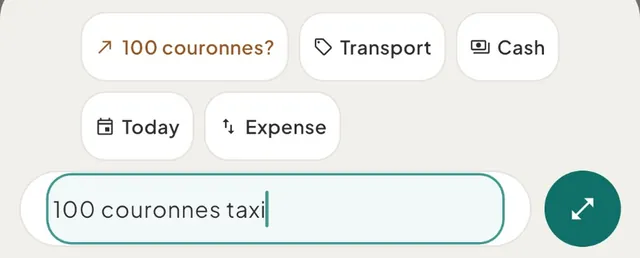
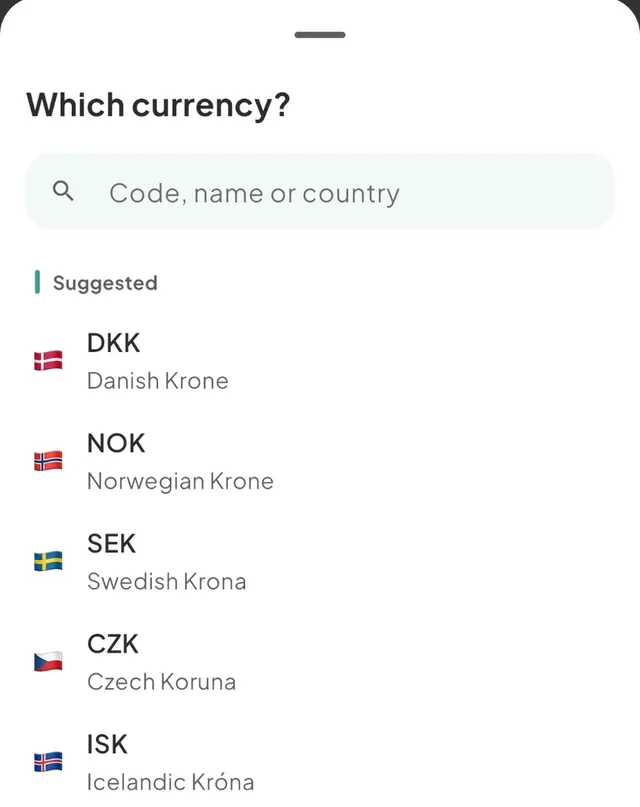
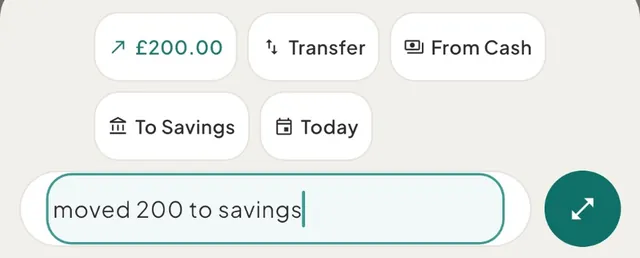
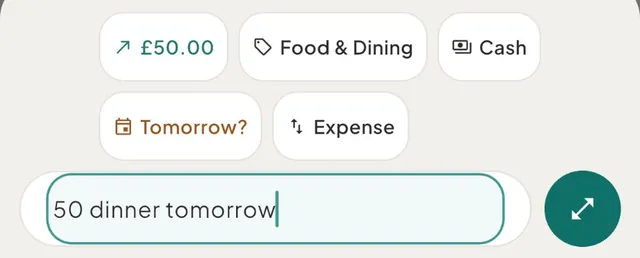
The bar never guesses in these cases: a day you typed that has not come yet, a shared currency word, a transfer and a second amount all wait for you.
Pick a date
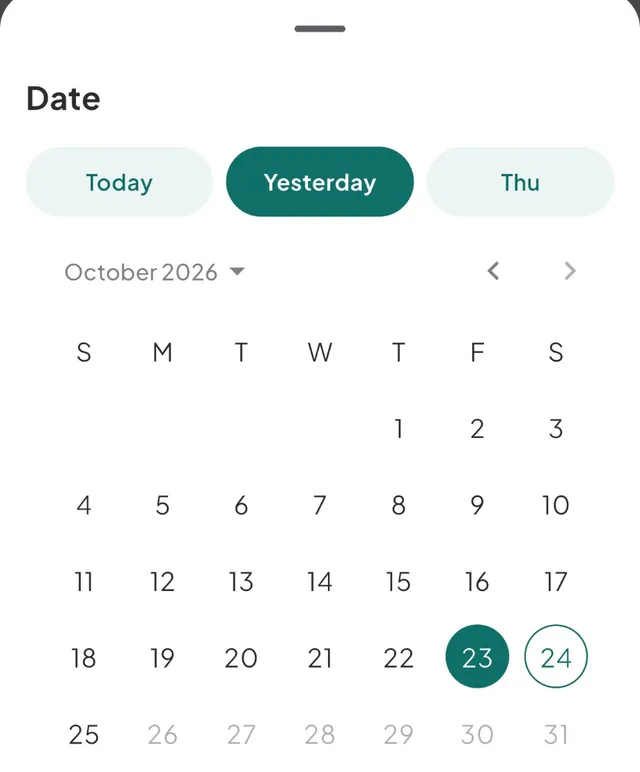
Tap the date chip. The Date sheet opens on the day the chip shows, with three quick choices above the calendar: Today, Yesterday and the weekday before that (such as Thu). Tap one, or pick any day in the calendar.
Pick a category
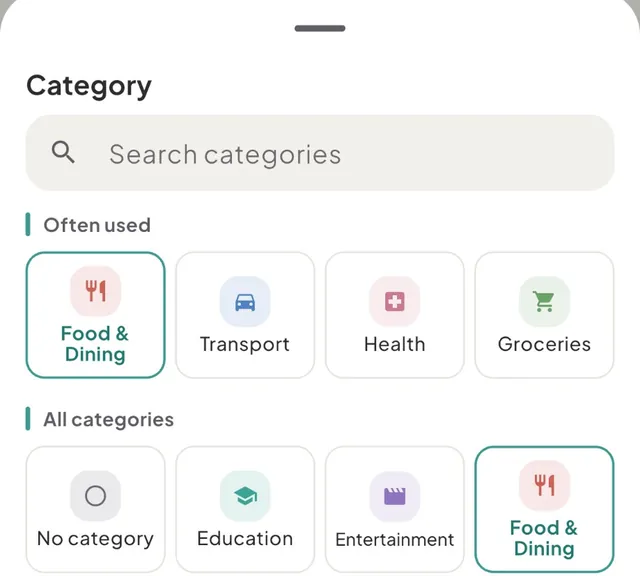
Tap the category chip. Once you have added eight or more entries with a category in this space over the last 90 days (expenses and income are counted apart), the picker starts with Often used: up to four categories you file under most. The full grid follows under All categories, and Search categories finds any of them. The same picker opens from the full form and from budgets.
What Tavala learns, and what it does not
Tavala learns from the entries you save in the capture bar:
- The category for a note. Save
kiosk 3with Shopping once, and the nextkioskis Shopping. A one-word note you taught it also works inside a longer line, sokiosk station 2is Shopping too. Your own category names still win over a learned choice. Pick No category on purpose to make Tavala forget the note. - The wallet for a note. A note starts on the wallet its last entry used, unless you tap the wallet chip, type a wallet word or a trip you are on has a Spend from wallet.
- Your answer about a shared currency, such as which
kryou mean.
What it does not do:
- It never fills in an amount by itself. An amount from your history appears only when you tap a suggestion chip.
- Bank imports never feed it. Suggestions, completions, learned categories and the often-used categories come from entries you added yourself. Rows a connected bank imported, bills that post by themselves and transfers are left out.
- Nothing leaves your device to be read. The line is read on your phone, tablet, Mac or browser, with no connection and no AI service. The learned categories and currency answers are stored on this device only and are cleared when you sign out. Suggestions are read from your entries, which sync like any other entry when you have an account.
Example lines in each language
These assume euros as the main currency, a Current account and Cash in euros, Dollar savings in US dollars, the starter categories, and today as Saturday 24 October.
| Language | You type | Tavala reads |
|---|---|---|
| English | coffee 4.80 | €4.80, Food & Dining, today |
| English | twelve fifty lunch yesterday | €12.50, Food & Dining, yesterday |
| English | about 45 dinner last night | €45.00 estimated, Food & Dining, yesterday |
| English | got paid 3200 | Income €3,200, Salary |
| German | 3,80 kaffee gestern | €3.80, Food & Dining, yesterday |
| German | vorgestern 1.500 laptop | €1,500.00, Shopping, Thursday 22 October |
| German | am samstag 45 rewe | €45.00, Groceries, Saturday |
| German | ca. 120 tanken | €120.00 estimated, Transport |
| German | gehalt 3200 bekommen | Income €3,200, Salary |
| Spanish | 3,80 café ayer | €3.80, Food & Dining, yesterday |
| Spanish | anteayer 23 mercadona | €23.00, Groceries, Thursday 22 October |
| Spanish | unos 30 taxi | €30.00 estimated, Transport |
| Spanish | dos mil quinientos alquiler | €2,500.00, Housing |
| French | 3,80 café hier | €3.80, Food & Dining, yesterday |
| French | avant-hier 23 monoprix | €23.00, Groceries, Thursday 22 October |
| French | quatre-vingt-dix-neuf courses | €99.00, Groceries |
| French | remboursé 40 chaussures | Refund €40.00, Shopping |
| Macedonian | 250 денари кафе вчера | 250 denar, Food & Dining, yesterday |
| Macedonian | синоќа 1200 ден вечера | 1,200 denar, Food & Dining, yesterday |
| Macedonian | околу 500 ден такси | 500 denar estimated, Transport |
| Macedonian | плата 40000 ден | Income 40,000 denar, Salary |
| Hindi | 200 रुपये खाना कल | ₹200, Food & Dining, yesterday |
| Hindi | दो सौ रुपये चाय | ₹200, Food & Dining |
| Hindi | लगभग 300 रुपये ऑटो | ₹300 estimated, Transport |
| Hindi | 500 rs kal khana | ₹500, Food & Dining, yesterday |
An amount in another currency is charged to the wallet at the day's rate; see record spending in another currency.
Good to know
- No amount, no save. Until the line has an amount, the bar offers your suggestions or says "Add an amount to save - like "3.80 coffee"". The round button then opens the full form with your words in it. With the field empty, it shows + and opens an empty form.
- The full form is one tap away. While the line can be saved, the expand icon inside the field (Finish in the form) moves everything you typed into the full form.
- There is no confirmation and no undo after saving. The bar closes and the entry is in Activity. To change or remove it, see edit, delete or undo a transaction.
- Which wallet. A wallet you tap wins, then a wallet word in the line, then the Spend from wallet of a trip you are on, then the wallet the note used last time, then your first spending wallet that is not connected to a bank.
- Offline. The capture bar works with no connection. With an account, the entry syncs when you are back online.
- What it cannot do. It does not split one purchase across categories, and it does not save two entries from one line. A transfer, a future day and a second amount are finished in the form.
Was this helpful?
No opens an email to support with this page’s address. Nothing is recorded here.