
What's Left, Money in, Money out and Spending
What each figure on Home, Budgets, Money and Reports counts, how Money out differs from Spending, and a worked example with real numbers.
On this page
Tavala shows a small set of named figures. What's Left is the balance of the wallets you spend from, right now. Money in and Money out are the cash that crossed into and out of those wallets this month. Spending is everything you consumed this month, including what you put on credit. Each figure has one meaning, and the same name always means the same thing.
The figures at a glance
| Figure | What it counts | Where you see it |
|---|---|---|
| What's Left | The balance of your spending wallets right now, in your main currency. Savings goals, debts, lending and investments are not in it. | The Home card |
| Money in | Cash that came into your wallets this month: income, plus any money you borrowed. | Home, the Money tab, In on Budgets, Reports |
| Money out | Cash that left your wallets this month: spending paid from them, plus loan payments (interest and principal). | Home, the Money tab, Out on Budgets, Reports |
| Spending | Everything you consumed this month, even on credit, including loan interest, minus refunds. | Spending in Reports, the totals on each day of Activity |
| Everyday spending | This month's spending without trips and projects. | The explainer sheet, while a trip or project exists |
| Cash kept | Money in minus Money out. | Kept on Budgets, Reports |
| Left in budget | A budget's limit minus what you spent against it this month. | Budgets, the Home budget card |
| Net worth | Everything you own minus everything you owe, at today's rate. | The Money tab |
Money in, Money out, Spending, Everyday spending and Cash kept cover the current calendar month. On the Budgets tab, In, Out and Kept cover the current week, which starts on Monday.
Open the explainer in the app
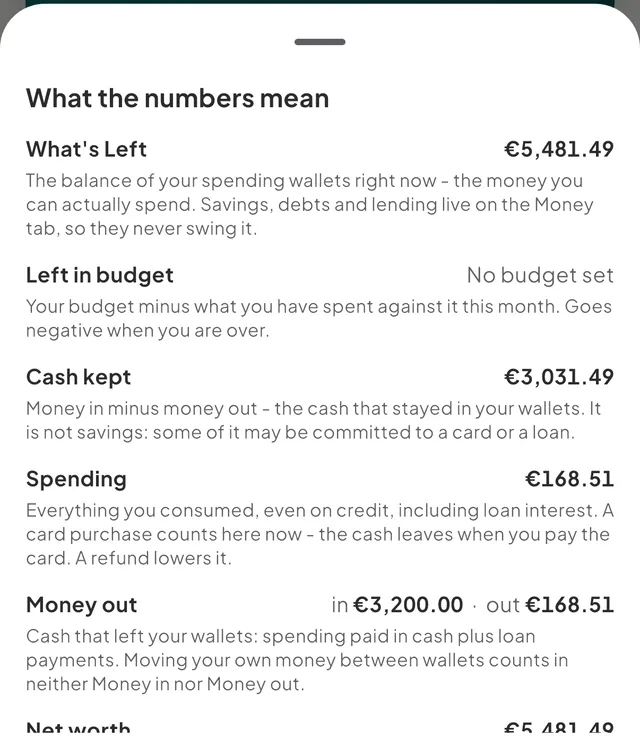
The sheet What the numbers mean shows each term with your own figure and its meaning. Open it from:
- The line under the What's Left figure on Home.
- The i on the Money in and Money out chips, and the note under them.
- The i next to a day's total in HomeActivity.
- The i on Kept in This week on the Budgets tab.
- The i on Spending in Reports.
What's Left
What's Left is the combined balance of your spending wallets right now, converted to your main currency at today's rate. It is the money you can spend. Savings goals, debts, lending and investments live on the Money tab and never move it. Archived wallets are left out.
What's Left is a live balance. It changes when you add an entry, correct a balance or move money between wallets. See wallet types.
Money in and Money out
Money in is cash that crossed into your wallets this month. It is income, plus any money you borrowed. When part of it is borrowed, the sheet adds a line such as "Money in includes €400.00 borrowed - not earnings".
Money out is cash that left your wallets. It is spending paid from a wallet, plus loan payments, interest and principal both. Two things never count in either: moving money between your own wallets (see move money between your wallets), and a purchase on a credit card until you pay the card.
A refund lowers Money out. A pending bank entry counts until the bank posts it, and the sheet notes how much is pending. Neither figure is shown below 0.
Spending
Spending is everything you consumed, even on credit, including loan interest. A card purchase counts in Spending the day you make it, because that is when you spent. It counts in Money out later, when the cash leaves to pay the card. A refund lowers Spending.
The two differ in three ways:
| Money out | Spending | |
|---|---|---|
| A purchase on a credit card | When you pay the card | The day of the purchase |
| Loan principal | Counts | Does not count |
| Loan interest | Counts | Counts |
Everyday spending
While you have a trip or a project that is not archived, the sheet adds Everyday spending: this month's spending without trips and projects. Budgets and insights read this figure. Spending still counts everything. See how trips and projects work.
Cash kept
Cash kept is Money in minus Money out: the cash that stayed in your wallets this month. It is not savings. Some of it may be committed to a card or a loan.
Net worth
Net worth is everything you own minus everything you owe, at today's rate. Your spending wallets, savings goals, money you lent and investments count as what you own. Debts count as what you owe. See the Money tab and your net worth.
An example
Take the month's starting balances: Current account €500.00 and Cash €120.00. During the month you
record salary 3200 (€3,200.00), rent of €900.00, groceries 62.40, coffee 4.80 and lunch 12+8
(€20.00).
| Figure | Value | How |
|---|---|---|
| What's Left | €2,832.80 | €620.00 you started with, plus €3,200.00, minus €987.20 |
| Money in | €3,200.00 | The salary |
| Money out | €987.20 | €900.00 + €62.40 + €4.80 + €20.00 |
| Spending | €987.20 | The same four entries |
| Cash kept | €2,212.80 | €3,200.00 minus €987.20 |
Now suppose the lunch (€20.00) was put on a credit card that you keep as a debt. Spending stays at €987.20, because you consumed the lunch. Money out drops to €967.20 and Cash kept rises to €2,232.80, because no cash has left yet. What's Left becomes €2,852.80. When you pay the card €20.00 from Current account, Money out returns to €987.20 and What's Left to €2,832.80.
Last, suppose the groceries and the lunch (€82.40) were on a trip named "Lisbon". Spending is still €987.20. Everyday spending is €904.80.
Good to know
- Past months do not move. Money in, Money out and Spending are locked at each transaction's date. Later rate changes do not alter them. What's Left and Net worth are live and use today's rate.
- Money out and Spending never read below 0. A refund larger than your spending shows as 0, with the refunded amount noted. Left in budget goes negative when you are over, and Cash kept keeps its sign.
- "≈ at today’s rate" or "≈ estimated rates" under What's Left means wallets in more than one currency were combined, or a rate was estimated. See how Tavala converts currencies.
- Hidden amounts replace every figure with dots, and the sentences leave the figures out. See hide amounts on screen.
- If a number looks wrong, see my balance or What's Left looks wrong.
- Other terms are in the glossary.
Was this helpful?
No opens an email to support with this page’s address. Nothing is recorded here.