
Update a balance that does not match
Open the wallet, tap Update balance and type the amount you can see. Tavala adds one dated correction for the difference, and you can undo it.
On this page
When a wallet's balance in Tavala differs from the real one (your bank app, the notes in your pocket), type the real figure in Update balance. Tavala adds one dated correction row for the difference. It changes the balance and nothing else: it never counts as spending or income.
Correct a balance
- On the Money tab, tap the wallet to open its register.
- Tap Update balance. You can also open Edit wallet (the pencil) and tap Update balance….
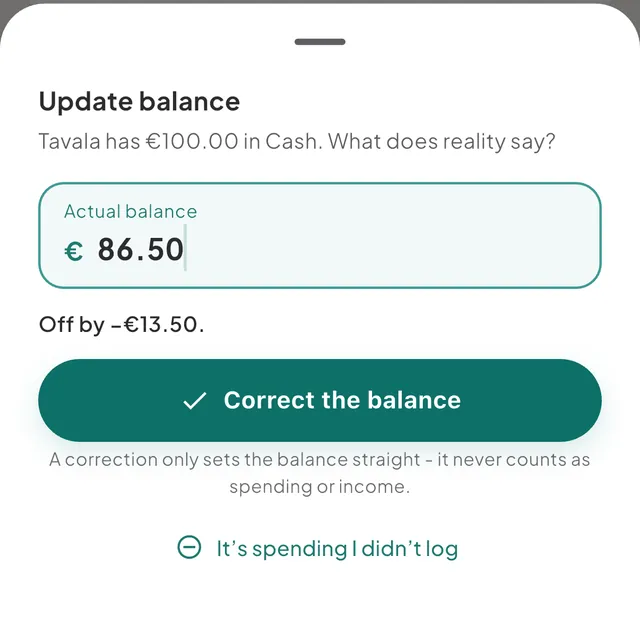
- The sheet says what Tavala has, for example "Tavala has €240.00 in Cash. What does reality say?". The Actual balance field starts with that figure. Type the real balance.
- A line under the field says "Off by +€5.00." or "Off by −€5.00.". Tap Correct the balance.
- A message reads "Balance corrected · +€5.00" with Undo. Tap Undo to take it back.
A spending wallet can be overdrawn, so you may type a negative balance there. For a debt the field is Amount you owe now, and for money you lent it is Amount you’re owed now. You type those as positive amounts.
If the difference is spending or income you did not log
For a spending wallet, the sheet also offers a second choice under the button:
- It’s spending I didn’t log when the real balance is lower.
- It’s income I didn’t log when it is higher.
Tap it and the transaction form opens with the difference already filled in. Save it like any other entry and it counts in your reports and budgets. Use the correction instead when the difference is not spending or income, such as a wrong opening balance.
What a correction does
- It is a row dated now, called Balance correction, in the wallet's register and in Activity. Its second line reads "Not counted in spending".
- It moves the balance, so What's Left and net worth follow. Spending, income, budgets, reports and Money in and Money out ignore it.
- It never rewrites the wallet's opening balance.
- To remove it later, tap the row in Activity or in the wallet's register, then tap Delete correction. To change one, delete it and run Update balance again.
Wallets connected to a bank
A wallet fed by a connected bank shows a line under its balance: "Matches the bank", or "Bank says €1,204.00" with a Review button. Review opens Update balance with the bank's figure filled in, so accepting it takes one tap. See what a connected bank imports.
Good to know
- Why the balance field is locked. Once a wallet has entries, its balance is the sum of those entries, so Edit wallet shows it read-only. Use Update balance to change it.
- After a trip, a Cash wallet used on the trip gets a Count your cash row in the trip summary. It opens the same sheet. See see what a trip or a project cost.
- If the numbers still look wrong, see my balance or What's Left looks wrong.
Was this helpful?
No opens an email to support with this page’s address. Nothing is recorded here.