
See what a trip or a project cost
A trip's page shows the total, the daily average, what is pending or estimated, a category breakdown and every entry. A finished trip adds a summary.
On this page
Every trip and project has a page that adds up what it cost. It shows the total so far, how it splits by category and wallet, and each entry day by day. When a trip is over, the same page becomes its summary.
Open the page
- Budgets tab: tap the trip under Trips & projects. Finished ones sit under a "2 finished" row that opens in place.
- HomeOverview: tap the trip card. With several open trips the card reads "2 trips & projects" with a combined total, and opens the Budgets tab, where each one is listed.
- Reports: tap the trip's chip under the Income, Spending and Net card.
- A finished trip also appears on Home for 14 days as a banner, "Lisbon finished · €1,780.00 over 8 days", with See summary. The x (Dismiss) hides it on this device.
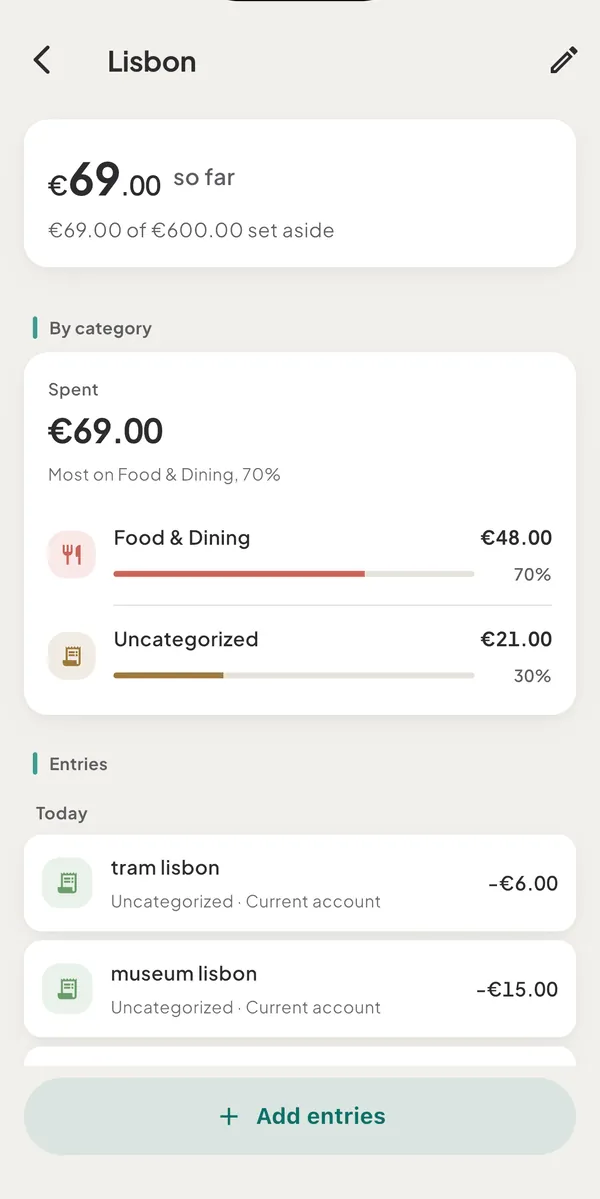
The total and the lines under it
The big figure is what the trip spent, net of refunds. It reads "so far" while the trip is open and "over 8 days" once it has finished. Under it you may see:
- incl. €12.00 pending · €5.00 estimated: the slice of the total that is still pending at the bank or marked as a rough amount. On a finished trip the estimated slice has its own line, "Estimated entries make up €310.00 of this".
- €60.00 paid back: income you attached to the trip. It is shown beside the total and is not subtracted from it.
- €163.00 a day (or "a day so far" while open): the total divided by the days of the trip. It is an average and never a limit. It appears for a trip with dates and at least two entries.
- €1,300.00 of €1,500.00 set aside: your optional Set aside amount as a fact. Past it, the line reads "€1,600.00 spent · €1,500.00 set aside". There is no "left" and no "over".
- Spend from: Cash: the wallet you chose, while the trip is still on.
- Not in this total: 1 entry without a rate (MKD 3,000): an entry in a currency with no rate yet cannot be added in. It joins the total once a rate exists.
On a finished trip you also get:
- Before the first day €480.00 · During €1,300.00: what was spent before the start, such as flights booked ahead, and from the first day on. They add up to the total.
- Spent from: Cash €420.00 · Current account €880.00: each wallet's share, in its own currency, at most three, then "+1 more".
- "Entries you add later still join."
After a trip: catch up
Two actions appear above the breakdown on a finished trip.
- Add what you forgot opens the capture bar with the trip already chosen and the entry marked
as a rough amount. Type
taxi 40and save. See log a rough amount. - Count your cash · Cash appears for each cash wallet that paid for the trip. It opens the Update balance sheet and asks "How much EUR cash is left?". If you enter less than the app expects, it says "€240.00 isn’t logged yet" and offers It’s spending I didn’t log. That opens the form with one rough expense on the trip's last day, without a category, for you to save.
By category and entries
- By category breaks the total down with a ring when enough categories carry a share, and a ranked list below. The figures are labelled Spent.
- Entries lists every entry day by day, newest first, with income you attached.
- Add entries at the bottom sweeps in more. See put spending on a trip or a project.
- Swipe an entry to the left to take it off the trip (Remove from Lisbon, with Undo).
Where else the trip shows up
- Budgets show it as outside: "Lisbon €180.00 · outside budgets".
- Reports list it in the split strip, next to Everyday. The CSV and PDF exports carry it.
- Home captions your Money out card with "Money out includes €1,780.00 for Lisbon".
- At the start of a month, Home may show a card once, with last month's Spending, Everyday and each trip. It opens that month's review in Reports.
Good to know
- "about" before an amount means an estimated or pending entry is inside it.
- Removed trips show "Not here anymore" and say where their entries went.
- Edit (the pencil) changes the name, the dates, Set aside and Spend from. See start a trip or a project.
Was this helpful?
No opens an email to support with this page’s address. Nothing is recorded here.