
Start a trip or a project
Name it, choose the dates and tap Save. A trip ending up to 60 days after it starts takes in expenses dated inside it. Leave the end empty for a project.
Create a trip or a project when you want a set of spending counted apart from everyday life. Only the name is required. The dates decide whether Tavala fills the trip for you.
Create one
- Open the form from one of these places:
- Money tab: tap + (Track something new), then Trip or project.
- Budgets tab: under Trips & projects, tap Track a trip or project if you have none yet, or Add a trip or project if you have some. The section appears once you have logged an expense.
- Any Part of sheet (the trip chip on an entry): New trip or project.
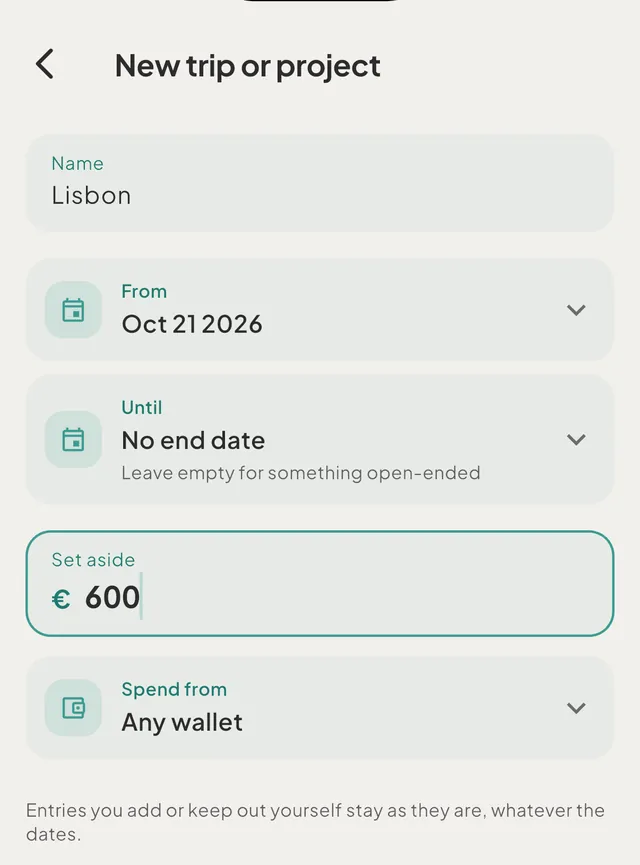
- Type the Name, for example "Lisbon". The hint reads "Italy, new apartment, wedding…".
- Set From. It starts as today.
- Set Until, or leave it as No end date for something open-ended. The hint in the field reads "Leave empty for something open-ended". Tap the x to clear a date you set.
- Optional: enter Set aside, an amount you plan for it, in your main currency.
- Optional: choose Spend from, a wallet the capture bar and the form should start on while the trip is on. This row appears only if you have two or more spending wallets, and reads Any wallet until you choose.
- Read the line under the dates. It says what the dates will do.
- Tap Save.
What the line under the dates means
- With an end date up to 60 days after the start, it reads "Expenses dated 3 Oct–10 Oct will join Lisbon. Bills, transfers and income never do." In a shared space it adds "from everyone in" the space's name. Entries already in your history with those dates join as soon as you save.
- With a longer span, it reads "Longer than two months - add entries with the chip". Dates then add nothing, and the trip works like a project.
- With no end date, no line appears. Nothing joins by date.
- If the new dates cover entries that now belong to another trip, the sheet says so first, for example "3 entries dated 23 Dec–25 Dec move from Christmas to Vienna". The shorter trip takes an entry that two trips cover.
Every form ends with the same note: "Entries you add or keep out yourself stay as they are, whatever the dates."
Good to know
- One name at a time. If you type the name of a trip that is not finished, the form says "Lisbon already exists" and Save becomes Open Lisbon, which takes you to that trip.
- Edit. Tap the pencil (Edit) on the trip's page. If you change the dates, the form says "2 entries now fall outside 3 Oct–10 Oct · 1 now falls inside" before you save, and afterwards a message "Lisbon now has 11 entries" with View.
- Mark as finished. In the edit form, Mark as finished sets the end date to today. The message reads "Lisbon ends today" with Undo. It is offered while the trip is under way. Entries dated after today no longer join by date.
- Reopen. Reopen clears the end date. It shows when the end date is today or in the past. Without an end date nothing joins by date, so entries that were in the trip only because of its dates go back to everyday. Entries you attached yourself stay.
- Remove. Remove takes the trip off your lists and keeps every entry. The message reads "Removed Lisbon - its entries count as everyday again", or names the trip whose dates now hold them. Undo restores it.
- Set aside is a fact. It never becomes a limit and never shows "left" or "over".
- Before the trip starts. A trip with a start date in the future is listed as "Lisbon · starts in 12 days". It already takes expenses dated inside its dates.
- Budgets and reports. Once spending joins, it moves out of your budgets. See how trips and projects work.
Was this helpful?
No opens an email to support with this page’s address. Nothing is recorded here.