
Reports: where your money went
Reports shows a month's income, spending and net, a breakdown by category, insights and a month in review. The year and date range views are part of Plus.
On this page
Reports answers "where did the money go?" for a month: what came in, what you spent, what is left over, and which categories took the most. Every month you have data for is free, with all of its history. The year view, any date range and the comparison with a year earlier are part of Plus.
Open Reports
- Phone: tap Money in or Money out on HomeOverview.
- iPad, Mac or the web in a wide window: choose Reports in the sidebar, or press Command-5 (Ctrl-5 on Windows and Android). On a Mac it is also in the View menu.
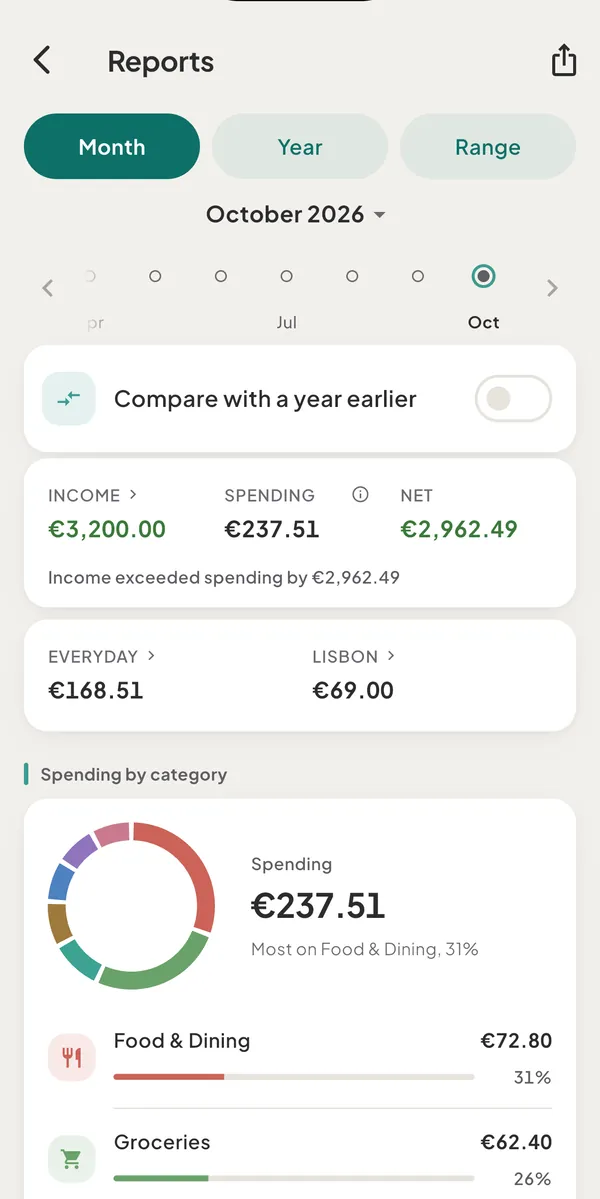
Choose the period
The pills at the top are Month, Year and Range.
- Month (every plan): tap the month name to pick from a list, step with the arrows, or tap a dot in the strip of months. A filled dot is a month with entries. Back to this month returns to now.
- Year (Plus): step with Previous year and Next year.
- Range (Plus): pick a From and a To date.
- Compare with a year earlier (Plus) adds a section "Against" the same days a year before, with Income, Spending, Net and each category, each marked with the change or Same.
On the free plan, tapping Year, Range or the comparison opens a sheet that says "The free plan shows each month. Plus shows any range and the year."
What is on the page
- Income, Spending and Net. Net is income minus spending for the period. A sentence under the three figures spells it out, such as "Income exceeded spending by €1,240.00", and "Spending is net of €45.00 refunded" appears when refunds were involved. Tap Income to list the income entries. The (i) beside Spending opens the What the numbers mean sheet.
- Everyday and trips. When a trip or project had spending in the period, a strip splits Spending into Everyday and each trip. Tap Everyday to see the breakdown without trips, or a trip to open its page.
- Cash flow. For a period with loan activity, this section breaks Money in into Earned and Borrowed, and Money out into Spending excl. interest, Loan interest and Loan principal. It ends with Cash kept and Net worth change.
- Insights, in the month view. See below.
- Spending by category. A ring and a ranked list. Tap a category to list its entries for the period. Entries without a category read Uncategorized.
- A note: "Figures are locked at each transaction's date, so a past month always shows the same totals. Transfers between wallets are not counted as income or spending."
What the numbers count
- Spending is everything you consumed in the period, net of refunds. A purchase on a credit card counts on the day you buy, and loan interest counts. Trips and projects are included.
- Transfers between your wallets and loan principal are not spending. This is one reason Reports and your wallet balances can differ over a period.
- Past months do not move. Each entry is valued at the exchange rate saved with it, so changing rates later does not rewrite history. See how rates work.
- Net is cash flow, not savings or net worth. Part of it may already be committed to a loan or a card.
Insights
Insights are plain sentences about a category, based on the month and the three before it. They read everyday spending only, so a trip's restaurants never make a category look high.
- "Food & Dining higher than usual", with "€340.00 vs about €210.00 typical".
- "Food & Dining rising 3 months".
- "Transport up 40%" or "Transport down 30%" compared with last month.
A category needs about 25 in your main currency to be flagged at all, each category gets at most one insight, and at most 4 show for a month. Tap one to see its entries. When a trip held a category for 7 or more days of a month, that category is not compared, and a line says so: "Lisbon · 8 days in October · comparison skipped".
On the free plan the page shows the top insight and then "2 more findings with Plus". Plus shows every one.
Month in review
For a finished month, a row "October in review" opens swipeable cards: Spent in the month and how it compares with the month before, Budgets, Cash and net worth, and Trips and projects, followed by a closing card with Share. Cards appear when there is something to say.
Share sends the month as a PDF. That is an export of a past month, so on the free plan it opens the Plus sheet instead. See export a report.
Free and Plus
| Free | Plus | |
|---|---|---|
| Any month, all history, category breakdown | Yes | Yes |
| Year view and any date range | - | Yes |
| Comparison with a year earlier | - | Yes |
| Insights per month | The top one | Every one |
| Export | The current month | Any period |
In a shared space, the plan of the space's owner decides.
Good to know
- No activity? An empty month says "No activity this month" with Add a transaction. A year or a range says "No activity in this period".
- Hidden amounts. The figures turn to dots and the sentences keep their words.
- Budgets live on the Budgets tab. Reports shows them only inside the month in review.
Was this helpful?
No opens an email to support with this page’s address. Nothing is recorded here.