
Spaces: keep separate money separate
A space holds its own wallets, entries and budgets. Switch spaces from Home, create more, and share one with the people you budget with.
A space is a separate set of books. Everything you record lives in one space: its wallets, entries, budgets, categories, recurring bills, bank connections and main currency. Tavala shows one space at a time, and every tab shows the space you are in. Use one space for your own money, another for a household or a small business, and share only the ones you want to.
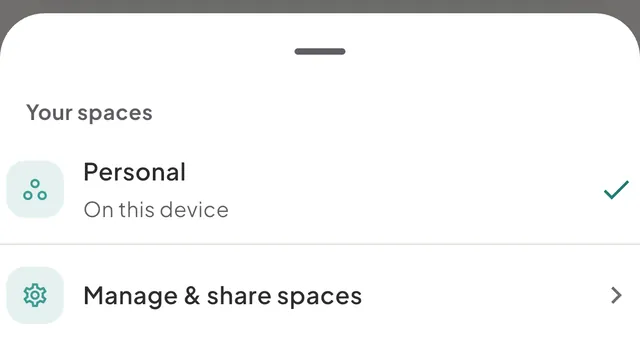
Switch between spaces
- Tap the space name at the top of Home. On a wide window, such as an iPad, a Mac or the web at full width, the name sits at the top of the sidebar instead.
- In the Your spaces sheet, tap the space you want. It becomes the active space and the sheet closes.
Each row has a second line. It reads Owner or Member, then the number of people, for example "Owner · 2 members". A space that has not been synced to an account reads "On this device". If two spaces share a name, the line also gives the day the space started.
The space you use is remembered per device. Switching on your phone does not switch your Mac.
Create a space
- Tap the space name at the top of Home, then Manage & share spaces.
- On the Spaces screen, tap + (New space) at the top right.
- Type a name, such as "Household", and tap Create.
The new space opens straight away. It starts with the starter categories and your current main currency, and no wallets: Tavala asks for the first one. Creating a space needs an account. If you use Tavala without one, the + button is not shown and the screen offers Create account.
A free account can own 2 spaces. Asking for a third opens the Plus sheet with "The free plan holds 2 spaces. Plus holds as many as you need." Spaces that other people own and you joined do not count toward your 2. See free and Plus compared.
Rename a space
Only the owner can rename. On the Spaces screen tap Rename under This space, type the new name and tap Save.
Private and shared
A space is private until you invite someone. People in different spaces cannot see each other's data, and the people you share one space with cannot see your other spaces. Sharing one space shares everything in it. See share a space with someone and what each member can do.
Inside a shared space, the owner's plan decides what the space allows, such as how many currencies it holds and which planning tools open. Your own plan decides your synced devices and how many spaces you own. Joining someone else's space is free.
Good to know
- The first space is called Personal. A new account starts with it. If you used Tavala as a guest first, that data moves into your account when you create one.
- Settings follow the space. The main currency belongs to the space, and only its owner can change it: SettingsMoneyMain currency. See choose or change your main currency.
- No moving between spaces. The app has no way to move a wallet or an entry from one space to another, and no way to delete a space or hand it to someone else. If an owner deletes their account, ownership of a shared space passes to the member who joined first, and the delete-account sheet names that person.
- Without an account your spaces stay on the device, with no backup. Sharing needs an account. See use Tavala without an account.
Was this helpful?
No opens an email to support with this page’s address. Nothing is recorded here.