
Choose or change your main currency
Your main currency is the one Tavala adds everything up in. Change it in Settings if you own the space; past entries are re-valued at their own dates.
On this page
Your main currency is the one Tavala adds everything up in: What's Left, net worth, budgets, reports and the payoff planner. Each space has one. You choose it with your first wallet, and the owner of the space can change it in Settings at any time.
Change your main currency
- Open Settings. On a phone, tap the round person icon at the top right of any tab. On an iPad or a Mac, it is at the foot of the rail or the sidebar.
- Under Money, tap Main currency. The row shows the current code on the right.
- In the Main currency sheet, pick a currency. The search field takes a code, a name or a country ("Code, name or country").
- Read the sheet Switch to GBP? (with your pick in place of GBP) and tap Switch to GBP.
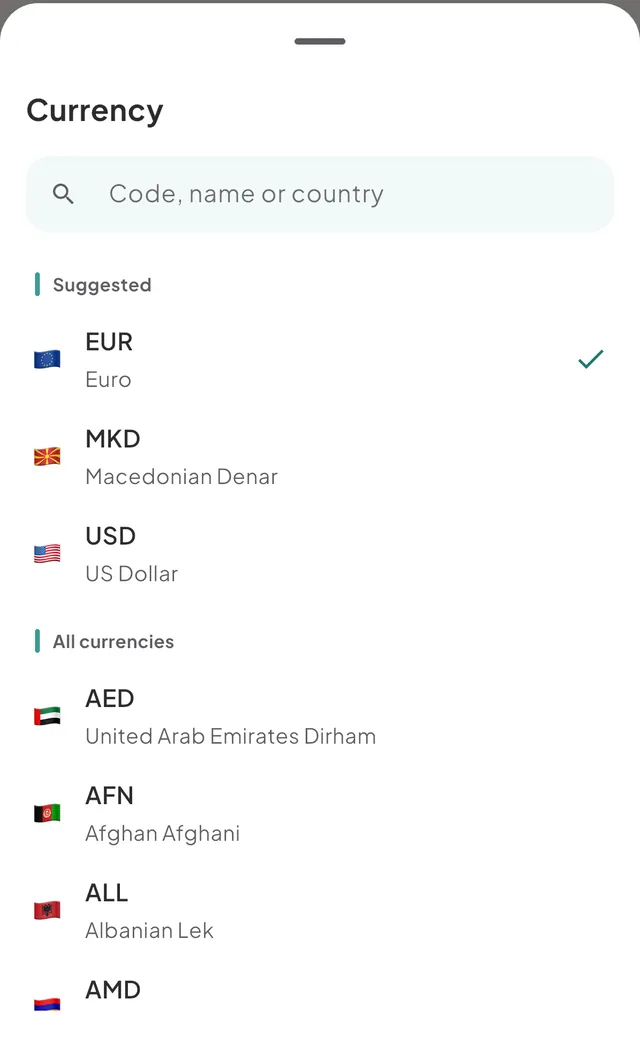
Picking the currency you already have changes nothing. You can switch back at any time.
What changes when you switch
- Totals are shown in the new currency. Home, the Money tab, budgets and reports all follow.
- Past entries are re-valued at the exchange rate on each entry's own date, so your history stays accurate. A few may be marked as estimated when an old rate is not known. An entry with no usable rate stays out of the totals until one exists. Entries where you typed your own rate are re-valued at the rate for their date as well.
- Budget limits and trip amounts you set aside are converted once, at today's rate. One that cannot be converted keeps its number.
- Wallets do not change. Every wallet keeps its own currency and its own balance. Only the way they are added up changes.
All of this is saved together. If it fails, the message reads "Could not change the main currency" and nothing changes.
Your first main currency
The first wallet you create sets it. On the screen Where does your money live?, the currency you pick for that wallet becomes your main currency. The screen says so under the field. It starts as your region's currency, or US dollars if Tavala cannot tell. See add a wallet.
Good to know
- Only the owner of a space can change it. In a space someone shared with you, the row reads "Only the space owner can change it" and does nothing when you tap it.
- Regular currencies only. A coin cannot be a main currency. Budgets and trip amounts are in the main currency too. See supported currencies.
- It is not a wallet. Choosing a main currency does not add a wallet in it. On the free plan, a space holds 2 currencies, counted from its wallets.
- Rates. Balances use today's rate and entries keep the rate of the day they were saved. See how Tavala converts currencies. The rate provider's credit is at SettingsAboutRates by Exchange Rate API.
Was this helpful?
No opens an email to support with this page’s address. Nothing is recorded here.