
The Plan tab
The Plan tab looks ahead: a cash-flow forecast built from your recurring bills and income, the debt payoff planner and the calculators, and what is Plus.
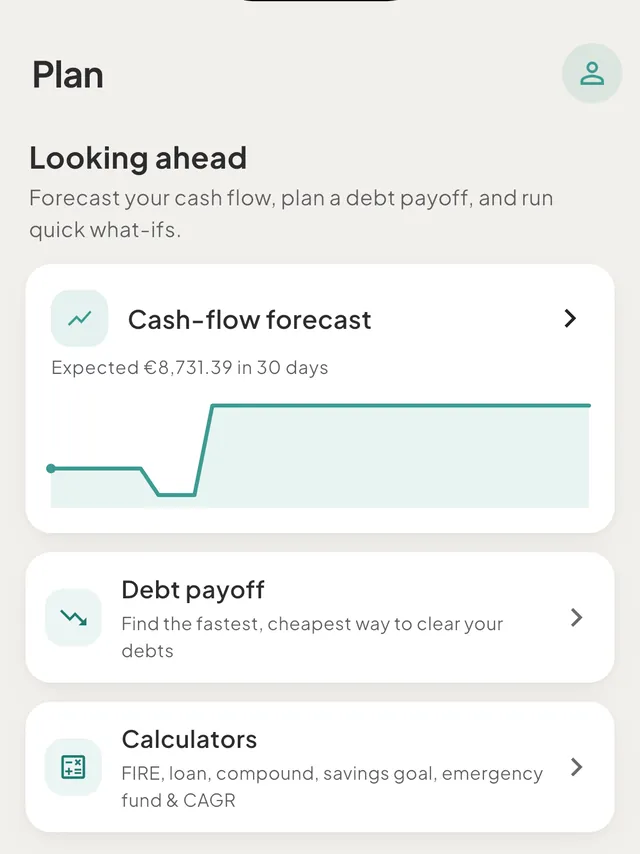
The Plan tab is the forward-looking tab. Budgets and Reports describe this month and the months before it; Plan describes what comes next. It has three cards under the heading "Looking ahead": the cash-flow forecast, Debt payoff and Calculators.
On a phone, Plan is the fourth tab in the bottom bar. On an iPad, a Mac or a wide browser window it is in the rail or the sidebar (Command-4, or Ctrl-4 on Windows and Android).
Cash-flow forecast
The forecast draws how your spending wallets move over the coming days, using only your recurring rules.
- No rules yet: the card reads "See your balance ahead" with a Set up recurring button.
- With rules: the card reads Cash-flow forecast, a line such as "Expected €2,430.00 in 30 days", and a small chart. If the line goes under zero, the line reads "Dips below €0.00 on" with the date. The card is always a 30 day preview. Tap it to open the full screen.
On the full Cash-flow forecast screen:
- Choose 30 days, 60 days or 90 days at the top.
- Read "Expected in 30 days" for the balance at the end, and the change over the period.
- Under the chart, read "Lowest point" with its date, or "Dips below €0.00 on" a date.
- Check Safe to spend and the Upcoming list below. See safe to spend.
When nothing moves the balance, words replace the chart, for example "No bills in the next 30 days, so the line stays level" or "Flat until Rent on 20 Oct".
How the line is built
- It starts from What's Left, the balance of your spending wallets.
- It adds your recurring income and takes off your recurring expenses and your recurring payments into loan and card wallets, on the day each falls due.
- It leaves out moves between your own wallets, such as savings goal top-ups.
- Amounts in other currencies use today's rate, because future rates are unknown.
- It does not include budgets or one-off spending you have not set up as a rule.
Debt payoff and Calculators
- Debt payoff opens the payoff planner. See plan to pay off your debts.
- Calculators ("FIRE, loan, compound, savings goal, emergency fund & CAGR") opens a set of what-if tools. See the calculators.
Free and Plus
- The forecast looks 30 days ahead on the free plan. 60 days and 90 days are part of Plus. Tapping one on the free plan opens a sheet that says so.
- The full debt planner works on your first debt on the free plan. Plus opens it for every debt.
- The plan of the space's owner decides, so in a shared space the owner's plan applies to everyone in it. See free and Plus compared.
Good to know
- Insights are on Reports. Spending trends and unusual categories live in Reports, not here.
- Hidden amounts. The forecast card keeps its words and drops the figures: "Expected balance over the next 30 days".
Was this helpful?
No opens an email to support with this page’s address. Nothing is recorded here.